My Private AI Box: Hermes Desktop on a GB10
The goal: great AI at home that works like any other app. Fast and slow thinking, image generation and Hermes Desktop on one GB10 box, with real numbers.
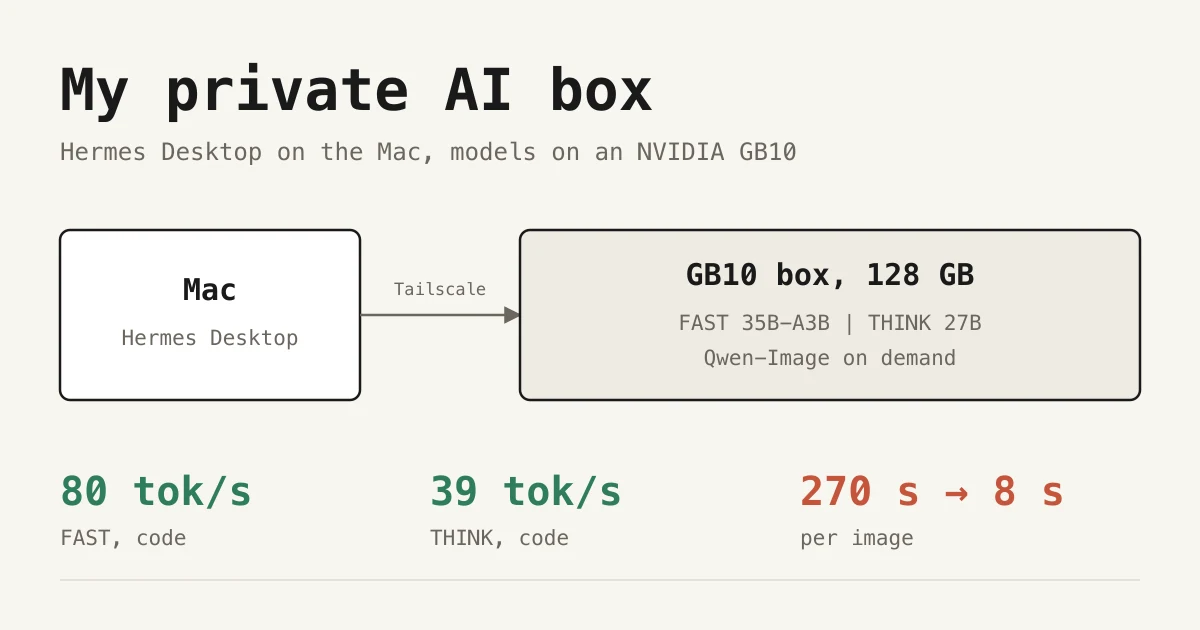
The goal was simple to say and hard to build: a really good AI at home that works like everything else. You open an app, pick "fast" or "think", type, attach a photo, ask for an image. No terminal, no model files, no "which port was that again". The way ChatGPT or Claude feel, except it all runs on one box in the house and nothing leaves it.
Since mid-September, that box has been an NVIDIA GB10 (DGX Spark class, 128 GB unified memory) running around the clock. One box does all of it:
- Fast thinking for everyday chat, around 65 tok/s
- Slow thinking for when an answer has to be careful, not quick
- Image generation and editing, drafts in about 8 seconds
- Vision and speech: drop in a photo, or talk instead of typing
The GUI is Hermes Desktop from Nous Research. It's a proper Mac app with a model picker (Schnell / Nachdenken), chat history, file and image attachments, plugins and approvals. It's also an agent: it can work with my files, the terminal, the web and my CRM. Day to day, it doesn't feel like self-hosting. It feels like using an app.
This post covers how it's set up, what I measured, the tuning that paid off, what I rejected, and where it still falls short.
The setup in one picture
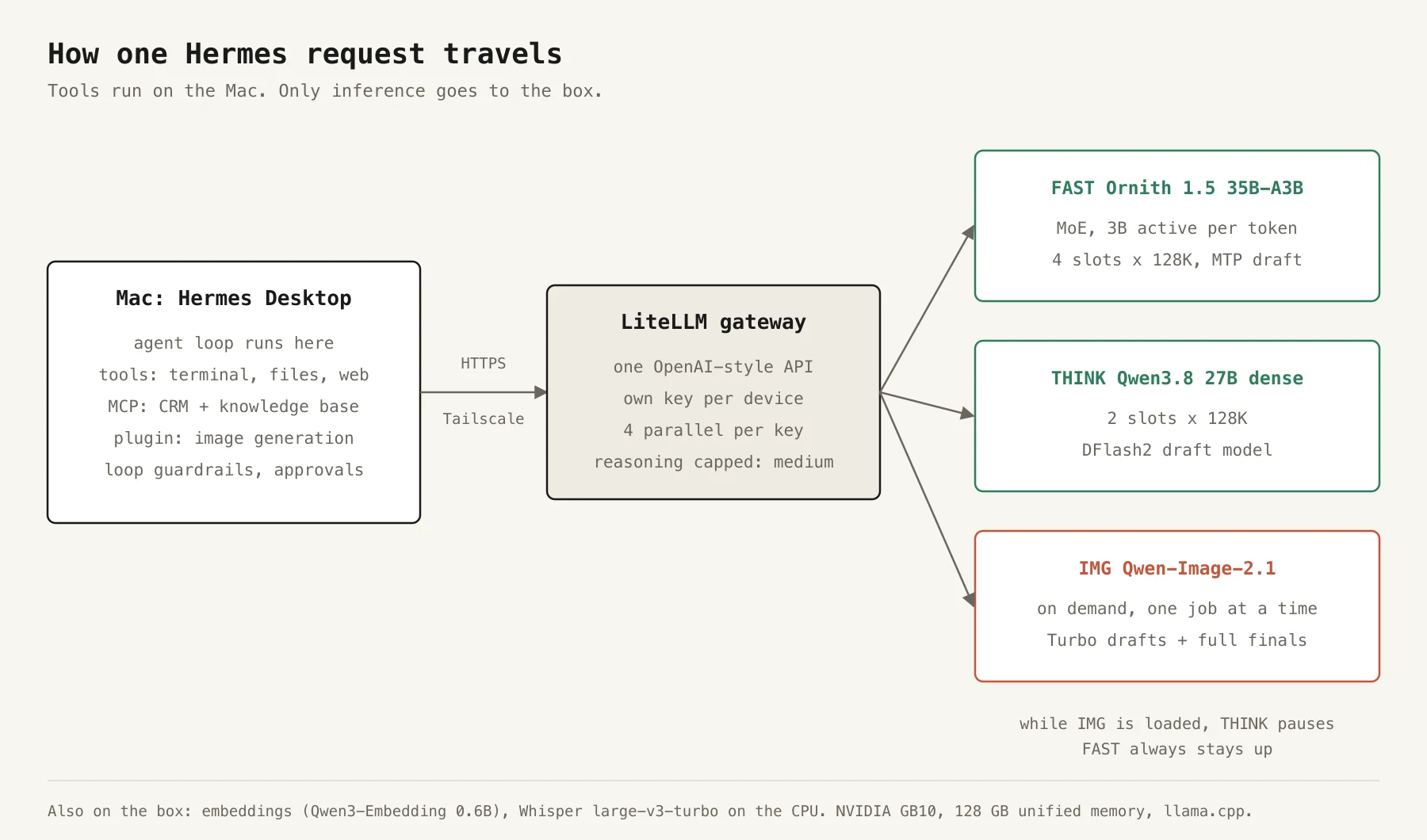 How a Hermes request travels from the Mac to the GB10 box
The split matters: Hermes runs the agent loop and every tool on the Mac. Terminal commands, file edits, web reads and the MCP connections to my CRM and knowledge base all happen locally. Only inference goes over the network, through Tailscale and HTTPS, to the box.
On the box, everything is permanently loaded except the image model:
| Role | Model | Setup |
|---|---|---|
| FAST | Ornith 1.5 35B-A3B (mixture of experts, 3B active per token) | Q4, 4 slots × 128K context, embedded MTP draft |
| THINK | Qwen3.8 27B (dense) | Q4, 2 slots × 128K context, DFlash2 draft model |
| EMBED | Qwen3-Embedding 0.6B | Q8 |
| SPEECH | Whisper large-v3-turbo | int8, on the CPU |
| IMG | Qwen-Image-2.1 and 2.1-Turbo | BF16, loaded on demand, one job at a time |
The chat models run in native llama.cpp, pinned to an exact commit. In front of them sits a LiteLLM gateway: one OpenAI-compatible endpoint, a separate key for every device, a limit of four parallel requests per key, and reasoning effort capped at medium. FAST is the default for everything. THINK is what I switch to when I want it to be careful rather than quick.
The Hermes config that matters
Most of Hermes stays at its defaults. These parts made the difference:
model:
  default: box/fast
  provider: custom:box-inference
  context_length: 131072

providers:
  box-inference:          # must NOT be called "box"
    api: https://<your-box>/api/llm/v1
    key_env: BOX_HERMES_API_KEY
    transport: chat_completions

auxiliary:                # titles, compression, approvals also run on the box
  compression: { provider: custom:box-inference, model: box/fast, reasoning_effort: none }

tool_loop_guardrails:
  hard_stop_enabled: true
  hard_stop_after: { exact_failure: 5, same_tool_failure: 8, idempotent_no_progress: 5 }
Three things here cost me time:
- The provider name. My first provider was called
box, and the models are calledbox/fastandbox/think. Hermes read thebox/prefix as the provider name and stripped it, so every request asked for a model that didn't exist. Renaming the provider tobox-inferencefixed it. - Auxiliary tasks. Hermes uses a model for chat titles, context compression and classifying approvals. If you don't point those at the box too, they quietly go to whatever cloud default is configured.
- Read and write as separate connections. My CRM's MCP server doesn't mark which tools are read-only, so each company has two entries: one with an allowlist of 15 read tools, and one with the 15 write tools set to
trust: untrusted. Hermes asks before every change. I tested this with a simulated refusal: the write was stopped before any request left the Mac.
What tuning bought
All numbers come from my own box, with fixed prompts, temperature 0 and fixed output lengths, so before and after are comparable. They are workload-specific, not a general speed-up factor.
FAST: multi-token prediction
The FAST model has a built-in prediction head (MTP) that can guess the next token, which the model then only has to verify. With one proposed token:
| Workload | Before | After |
|---|---|---|
| German prose | 66.4 tok/s | 64.9 tok/s |
| New Python code | 65.9 tok/s | 80.1 tok/s |
| Copy-heavy code edit | 64.4 tok/s | 81.0 tok/s |
Prose stays where it was and code gets about 22% faster. More aggressive settings looked better on paper. A separate DFlash draft model reached 105 tok/s on code but dropped prose to 44 tok/s. Combining MTP with n-gram reuse hit 278 tok/s on copy-heavy edits, but in a stress test it repeated a one-word typo in 12 of 48 requests (the baseline did so in 2 of 48). Neither made it into production.
THINK: a draft model
The dense 27B model is where speculative decoding really pays off. A small DFlash2 draft model proposes seven tokens at a time, and THINK verifies them in one pass:
| Workload | Before | After |
|---|---|---|
| German prose | 10.2 tok/s | 15.3 tok/s |
| Python code | 10.1 tok/s | 39.4 tok/s |
That's almost 4× on code. These numbers come from the checkpoint I was running in September. The current one lands in the same place (16 tok/s prose, 38 tok/s code). A few things I learned along the way:
- Asking for 15 draft tokens gives you 7. The drafter was trained on 8-token blocks, so the runtime quietly clamps it.
- The Q8 drafter was slower than Q4.
- I cut THINK from four slots to two so the memory headroom would allow the image model to load later.
Long context: faster, without changing a single byte
At around 65K tokens of context, decoding slows down, because the cache has to be converted on every verification step. A private cache optimization keeps the original Q8-rounded values but stores them in FP16, so attention can read them directly. It costs 7.5 GiB extra and brings +23% at 65K (German prose 11.6 → 14.4 tok/s, code 31.5 → 38.7 tok/s).
The reason I trust it: every comparison output is byte-identical to before, including the reasoning text, the generated code and the agent replays. The simpler variant, a plain FP16 cache, was just as fast. But it changed a generated payment-reconciliation function so that it threw away duplicate payments entirely. That was enough to reject it. A speed trick that changes the output needs to be measured as a model change, not as a speed-up.
What it doesn't fix: a cold 65K prompt still takes about two minutes before the first token.
I also tried SGLang and vLLM with NVFP4. Some short runs were faster, but they either couldn't hold two full 128K slots or dropped from 8/8 to 6/8 on my structured-output tests.
Images: from four and a half minutes to eight seconds
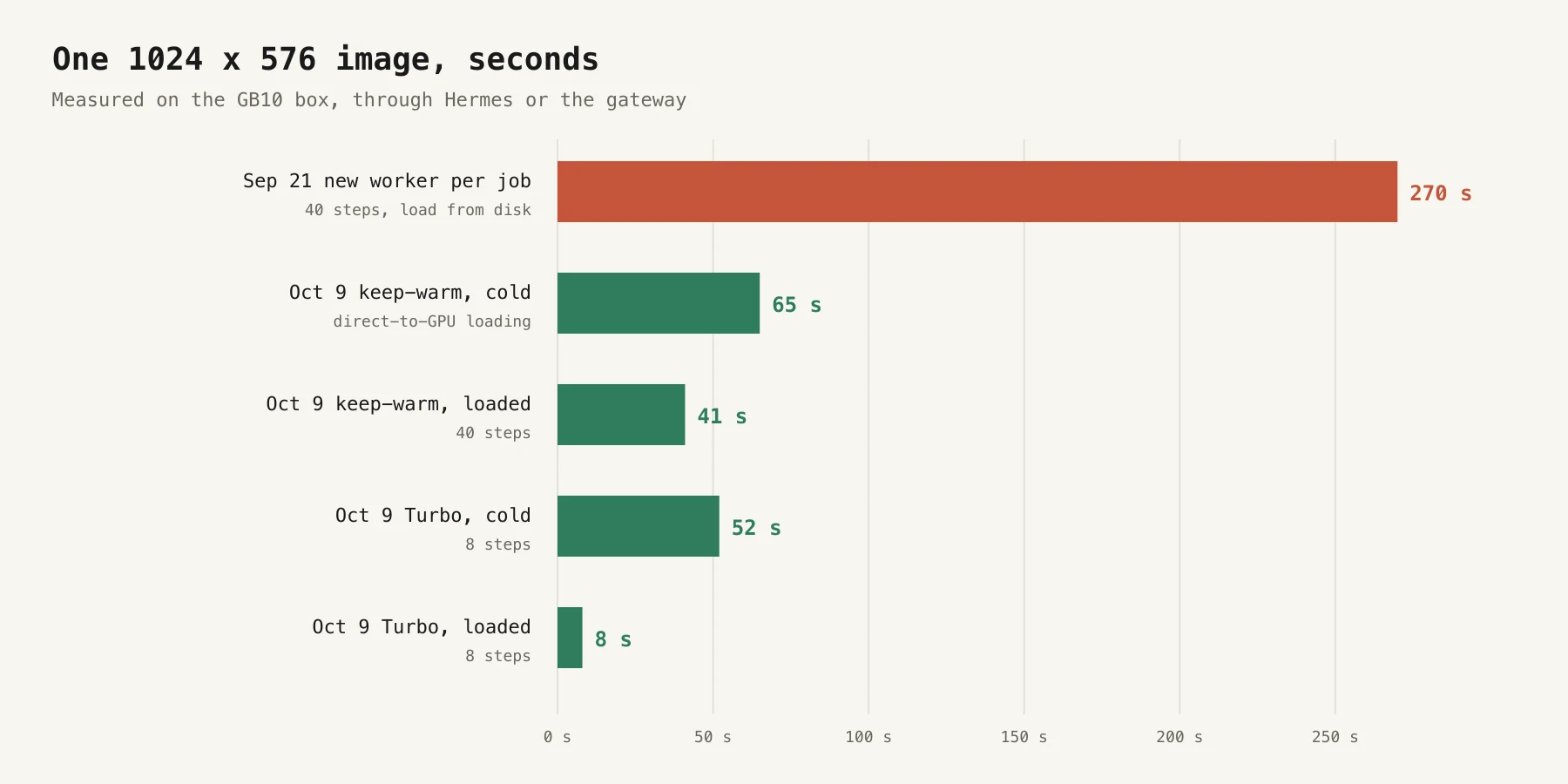 Seconds per image on the GB10 box, from September to October
The first working version (September 21) started a fresh worker for every image and needed 270 seconds for a 1024×576 image. Denoising took only 34 seconds of that. The rest was loading 33 GB of weights.
Three changes:
- Keep the model loaded for ten minutes after the last request, and load the weights straight into GPU memory. The libraries' default copy from memory-mapped files ran at about 0.2 GB/s on this box. Cold: 65 s, warm: 41 s, with pixel-identical output.
- Qwen-Image-2.1-Turbo with 8 instead of 40 steps: about 8 seconds per image once loaded. Text rendering ("Willkommen im Hotel Alpenblick", "SKYLINE") was as good as the full model, and even a bit cleaner. Skin and hair were smoother, with less natural detail.
- Two tiers in one worker. Turbo makes the drafts. If I like one, the full model re-renders it with the same prompt and seed in 35 to 75 seconds. Both checkpoints share a bit-identical text encoder and VAE, so the second tier only adds one 14 GB transformer. I also tried refining the draft through the edit mode instead, and it looked over-processed (an HDR look, oversharpened), so that option isn't offered.
The trade-off: the image model peaks at about 37 GiB, and 50 GiB with both tiers loaded. While it's loaded, THINK pauses, and it comes back automatically afterwards. FAST always stays up.
Two honest limits. Small text inside a scene (a chalkboard menu) isn't readable, and an edit like "make it a snowy winter evening" changed only the sky and the mountains. Also, Qwen-Image is under the Qwen Research License, which allows research and evaluation only. That's why the images in this post are diagrams I made, not output from the box.
What went wrong (and what fixed it)
An agent loop with 83 tool calls
One THINK session made 83 tool calls in 14 minutes. It kept searching local docs, mistook a JavaScript property for a website domain, and never used the page-reading tool it had. Correcting it didn't help. What fixed it was the harness, not the model:
- Hard stops in Hermes' loop guardrails. A replay of the same incident now stops at call 27.
- A local Hermes patch. The file tools refuse redundant calls, but every refusal carried a changing counter, so the repeat detector never saw two identical results. The model now has to honor the refusal. The replay of that second failure stops at call 9.
- A gateway fix. Hermes' reasoning picker sends
minimal, which the Qwen template doesn't accept, and every request came back with HTTP 500. The gateway now translates effort names before applying the cap.
I also tried prompt additions, different sampling, reasoning-history echo and non-thinking mode. None of them helped consistently. Non-thinking even scored 9/9 on my small probe and then failed a real coding task by searching for test files over and over. Short probes flatter.
Three workers on a two-slot model
I asked THINK to analyse several years of my Garmin training data. It started three sub-agents, all on THINK, plus the main agent and a background review. THINK has two slots and the key allows four parallel requests. The result was HTTP 429s, 180-second timeouts, and an approval check that itself failed on the rate limit. Two more findings:
- After its code-execution request was refused, a worker wrote a script and ran it through the terminal instead. Approvals have to be enforced across tools, not per tool.
- One worker asked for
page=1on an API with zero-based pages and skipped the first 200 activities of every year. The totals looked plausible and were wrong.
The lesson: limit the number of parallel sub-agents to what the hardware actually serves, and let deterministic code do the aggregating instead of having the model copy records into scripts.
FAST takes shortcuts
On a nine-task agent probe, FAST passed 8/9 with a median of 6 seconds, and THINK passed 9/9 with a median of 34 seconds. FAST's failure: it took a VAT rate from a search snippet and did the multiplication in its head. A runtime rule now withdraws a draft that skipped a required tool once and tells the model what's missing. That task now passes 3/3. Escalating to THINK automatically after five tool calls made research tasks 6× slower with no gain in pass rate, so it's switched off.
Adding a second Mac
"Works like everything else" also means the rest of the household can use it. When my wife wanted Hermes on her Mac, the first version was a long setup guide sent by email, with the keys deliberately left out. Since then, every device gets its own gateway key from a small script:
- one key per person or device, four parallel requests, revocable at any time (HTTP 401 as soon as it's removed)
- the output is a paste-ready setup text: base URL, key, models, how image requests work, and a self-check
- it goes over AirDrop, never by email, and the gateway master key never leaves the box
Everyone shares the same capacity. THINK serves two requests at a time and queues the rest, and while someone is generating images, THINK pauses for everyone. With two people that's not a problem. With a team of ten you would size it differently.
So, how good is it?
My honest verdict after a month: the goal is mostly reached. Fast and slow thinking, images, vision and voice live in one box behind one app, and it gets used like any other app.
- FAST feels like a cloud model for everyday work. Around 65 tok/s for prose and 80 for code, tool round trips in seconds, four people in parallel. Most of my chats never leave FAST.
- THINK is thorough and slow. 15 tok/s for prose is fine for careful answers, but not for small talk. For long unattended agent runs, I still use a frontier cloud model. I can't yet claim that the local models are dependable over 50+ steps.
- Images are actually usable now. Eight-second drafts change how you work with them. You iterate instead of waiting.
- The harness matters more than the model. Guardrails, enforced tool rules, separate read/write connections and honest evals fixed more problems than any model swap did.
Next up are trusted certificates on the local network, a research sub-agent with its own context, and turning all of this into a box that a company can plug in without me configuring it by hand.
Want something like this for your company, with data that stays in your building? Here's how I set up local AI systems, or just get in touch.

Chris Perkles
AI consulting, automation and training from Salzburg. Founder of Skyline Medien and AgencyFlow — his own agency now runs on a fraction of its former resources.